Halloween Card Designer Game
Review
Happy Halloween: Princess Card Designer is a charming online game that sparks creativity. The drag-and-drop interface is simple, and the spooky decorations are family-friendly. Printing your card adds a personal touch. Perfect for kids and adults alike, it's a delightful way to celebrate Halloween without any hassle.
About This Game
Game Introduction
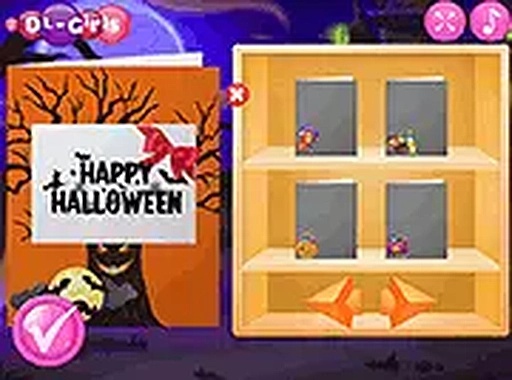
Happy Halloween: Princess Card Designer is a delightful online game that lets you create personalized Halloween cards for your loved ones. As Halloween approaches, you can use a variety of spooky yet family-friendly elements like ghosts, witches, pumpkins, abandoned houses, and bats to decorate your cards. The game is perfect for all ages, offering a safe and creative way to celebrate the holiday. Once your masterpiece is ready, you can print it out and share the Halloween spirit with friends and family. Whether you're a fan of princesses or just love crafting, this game provides endless fun without any downloads or installations.
How to Play
Playing Happy Halloween: Princess Card Designer is simple and intuitive. Start by choosing a card template from the available options. Then, drag and drop decoration elements onto the card to create your unique design. You can resize, rotate, and reposition items like ghosts, pumpkins, and bats to achieve the perfect look. The game runs directly in your browser, so no downloads are needed. For a more immersive experience, you can switch to full-screen mode. Once you're satisfied with your creation, simply click the print button to get a physical copy of your card. It's that easy!
Game Features
Spooky yet safe decorations, print function, no downloads, full-screen mode, family-friendly.
Tips for Success
To create the most charming Halloween cards, experiment with different combinations of decorations to find a balanced layout. Try layering elements like placing a pumpkin next to a ghost for a fun contrast. Use the resize and rotate tools to make each item fit perfectly. If you're unsure where to start, pick a template and gradually add your own touches. Finally, preview your card before printing to ensure everything looks just right. Most importantly, have fun and let your creativity shine!
🛠️ Compatibility
• OS: Windows 10+, macOS 11+, iOS 14+, Android 10+ • Browsers: Chrome 100+, Safari 15+, Edge 100+, Firefox 100+ • Not compatible with Internet Explorer Tested on real devices – works as expected